Syntax highlighting
Make common code and structured text easier to distinguish in a crowded history.
Persist X keeps recent text and code searchable, makes snippets easier to recognize, and turns the clips you use most into quick keyboard actions.
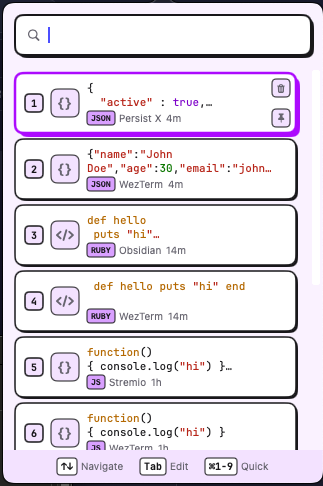
Lavender · A calm clipboard history
Persist X is designed around the repeated text and code fragments that move through a developer's day. It keeps the interaction fast and the source context visible.
Copied text remains in searchable history so one overwritten clipboard does not mean finding the source again.
Recognize code through syntax highlighting, filter the history, and use the source app as another clue.
Pin the items you reuse and paste the first nine results with Cmd+1-9.
Make common code and structured text easier to distinguish in a crowded history.
Search, choose, and quick-paste frequent results without turning a small action into a mouse trip.
Keep commands, snippets, addresses, or repeated responses near the top when they matter every day.
Move useful commands, decisions, snippets, and next steps into a local-first Markdown workspace when they need to outlive clipboard history.
Persist X is focused on fast desktop clipboard reuse. Here is the current release boundary.
Yes. Persist X 1.1.0 is free to download and does not require an account.
Persist X requires macOS 13 or later and supports Apple silicon and Intel Macs.
Persist X adds syntax highlighting, keyboard-first search, pinned clips, source-app search, and Cmd+1-9 quick paste to clipboard history.
Download Persist X for Mac and make the next repeated paste faster.